Newsletters are a reliable way to keep your subscribers engaged on a recurring basis. Done well, they build trust, reinforce your product's value, and drive users back to your website or app with timely, relevant content.
In this post, we'll break down 18 real newsletter examples from leading SaaS companies in 2026, highlighting the specific elements that make each one effective.
Why send a newsletter?
Newsletters serve a different purpose than transactional or product notifications. Where a transactional email responds to a specific user action, a newsletter reaches users proactively — whether they've been active in your product recently or not.
This makes newsletters a uniquely powerful re-engagement tool. They give your team a direct line to users who might otherwise go dormant, and they give your users a reason to come back. A well-crafted newsletter can surface new features, share educational content, and highlight community wins — all in a format users expect and can consume on their own time.
For SaaS companies, newsletters also bridge the gap between product and marketing. Product teams can share what they've shipped, marketing teams can distribute content, and growth teams can nudge users toward deeper adoption — all within a single, recurring touchpoint.
The companies that do this best treat their newsletter as a product in its own right: something with a clear purpose, a consistent voice, and content worth opening every time.
Why newsletters so often fail
Many SaaS newsletters fall flat — not because the idea is wrong, but because the execution breaks down in predictable ways.
Lack of content
The most common failure is a lack of content. Teams commit to a weekly or monthly cadence, then struggle to produce enough valuable material to fill each issue. The result is generic product updates, recycled blog posts, or filler content that slowly trains users to ignore the newsletter over time. Once a reader skips a few issues, they rarely re-engage.
Lack of consistency
That content gap creates a second problem: inconsistency. When teams don't have enough to share, they delay or skip sends. Users stop expecting the newsletter, open rates decline, and the channel loses its effectiveness as a re-engagement tool.
Lack of structure
Even teams with plenty of content to share can stumble on execution. Rigid templates that don't adapt to the content at hand can bury great content beneath walls of text, or force every update into the same format regardless of importance. The final email may look polished, but it doesn't prioritize what's important to the reader.
Lack of polish
Alternatively, sometimes the visual design leaves readers wanting more. Teams that underinvest in layout, hierarchy, and visual polish end up with newsletters that feel like an afterthought rather than an extension of their product. The result is an email that users skim past without engaging.
The difference between a newsletter that gets read and one that gets archived comes down to three things:
- Clear value.
- Engaging design and formatting.
- A deep understanding of your audience.
Effective newsletter content
The best SaaS newsletters succeed because they have a clear point of view on what content their audience needs and they deliver value consistently, without wasting the reader's time.
Every issue should earn its place in the inbox. The content that tends to perform best in SaaS newsletters is specific and actionable: a walkthrough of a new feature and how to use it, a case study showing how a customer solved a real problem, a roundup of recent integrations or API changes, or a curated set of templates and resources that help users do their job better. Sharing company news and generic blog posts don't give readers a reason to keep opening.
The most effective SaaS newsletters share a few common traits:
- Lead with the most important or compelling content.
- Use clear section headers so readers can scan and jump to what interests them.
- Keep copy concise — a few sentences per section, then link out for more detail.
- Maintain a consistent structure from issue to issue so readers know what to expect.
- Include clear CTAs that drive users back into the product or to specific resources.
There are also some design best practices to keep in mind:
- Use a single-column layout for mobile readability.
- Maintain a consistent visual hierarchy with headings, spacing, and imagery.
- Keep images purposeful — product screenshots, diagrams, or illustrations that support the content.
- Aim for an 80:20 text-to-image ratio for accessibility and deliverability.
- Ensure buttons are at least 44x44 pixels for mobile tap targets.
If your newsletter follows a predictable structure, your readers will develop a habit of scanning and engaging with it — which is the entire point.
18 examples of SaaS newsletters
For some inspiration on what your newsletter could look like, let's see some examples from top SaaS companies.
Clay
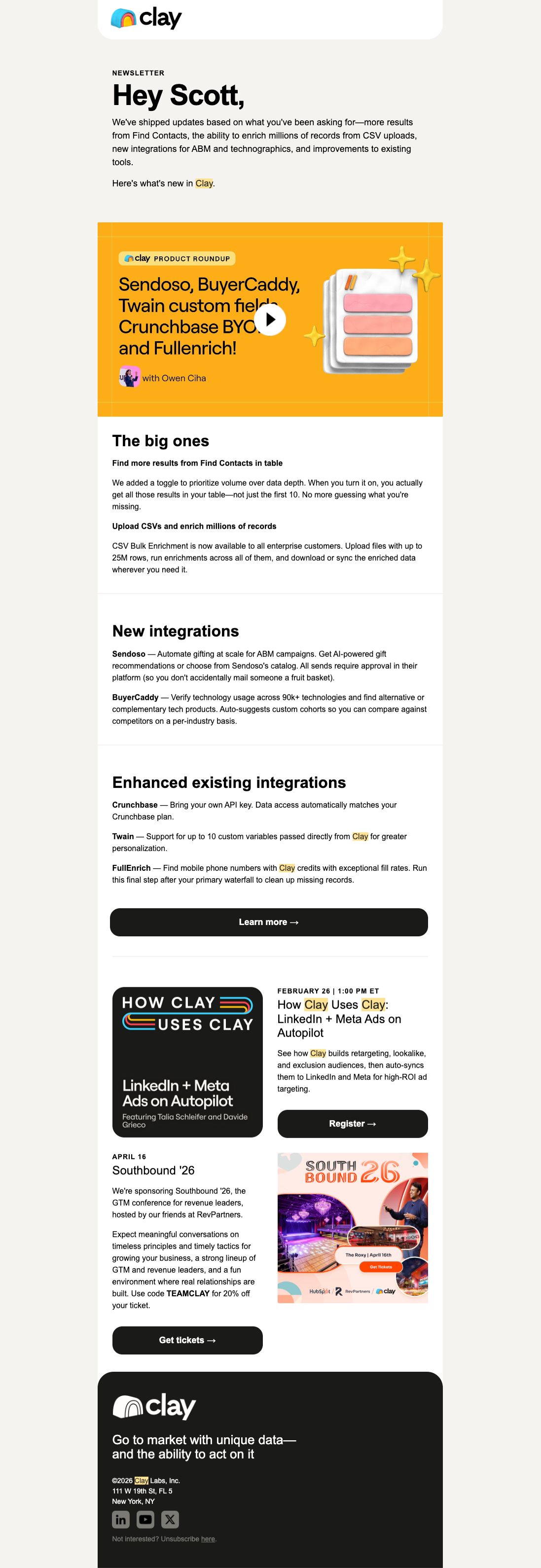
This Clay newsletter efficiently highlights recent product updates and does a good job packaging them into clear buckets: big improvements, new/enhanced integrations, and events. This structure helps readers self-select into the parts most relevant to them. It's a smart way to make a dense product update feel skimmable while giving commercial CTAs room to perform.
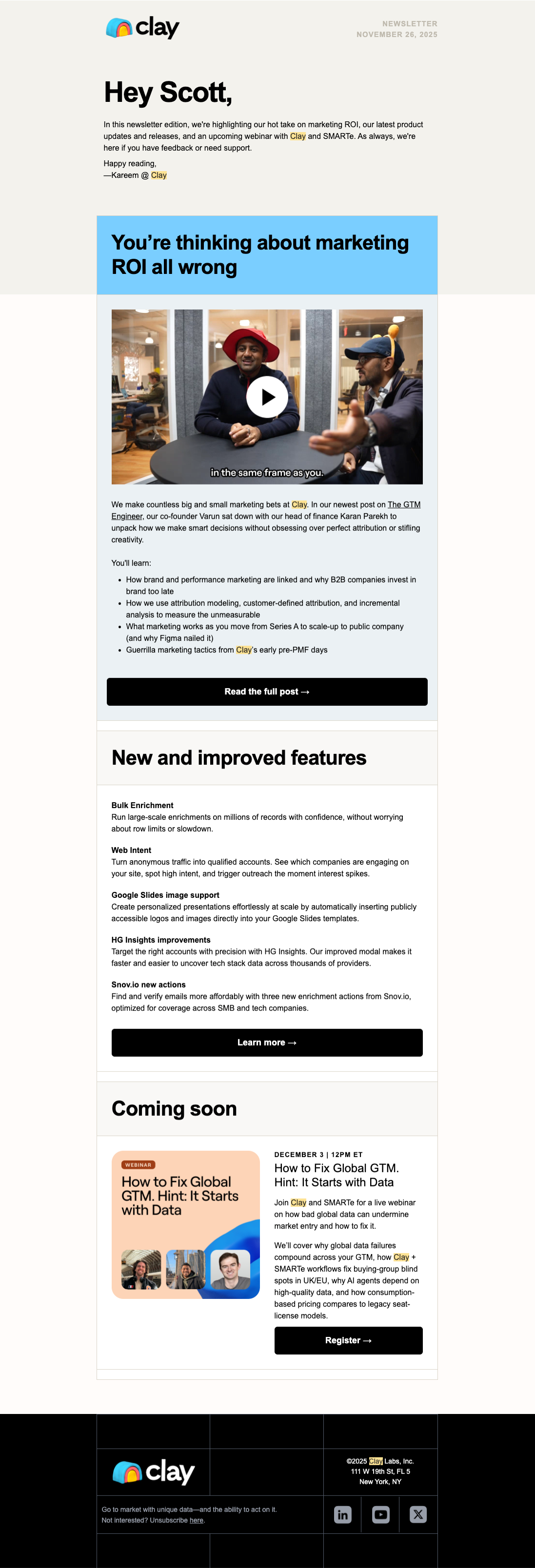
This second Clay newsletter focuses more on thought leadership while mixing in Clay functionality without feeling scattered. The opening story on marketing ROI gives the email a strong editorial hook, the feature section reinforces how the product fits in, and the webinar CTA creates a clear conversion event. This structure serves both category education and demand capture in the same send.
Vercel
Vercel newsletters are a masterclass in how to efficiently package product updates. In this issue, it opens with major releases, gives each one just enough context to matter, and then expands into ecosystem and community content without losing focus. This is effective because it lets Vercel serve both existing power users and more casual subscribers in the same message, while the stripped-down presentation keeps the emphasis on substance rather than marketing gloss.

Webflow
What makes this Webflow email work is that it is less about Webflow the company and more about the world around the product. It curates inspiration, career content, community work, and events in a way that reinforces belonging. Community-driven products grow when users see themselves inside an ecosystem, and this email does a good job of making participation feel aspirational and accessible at the same time.

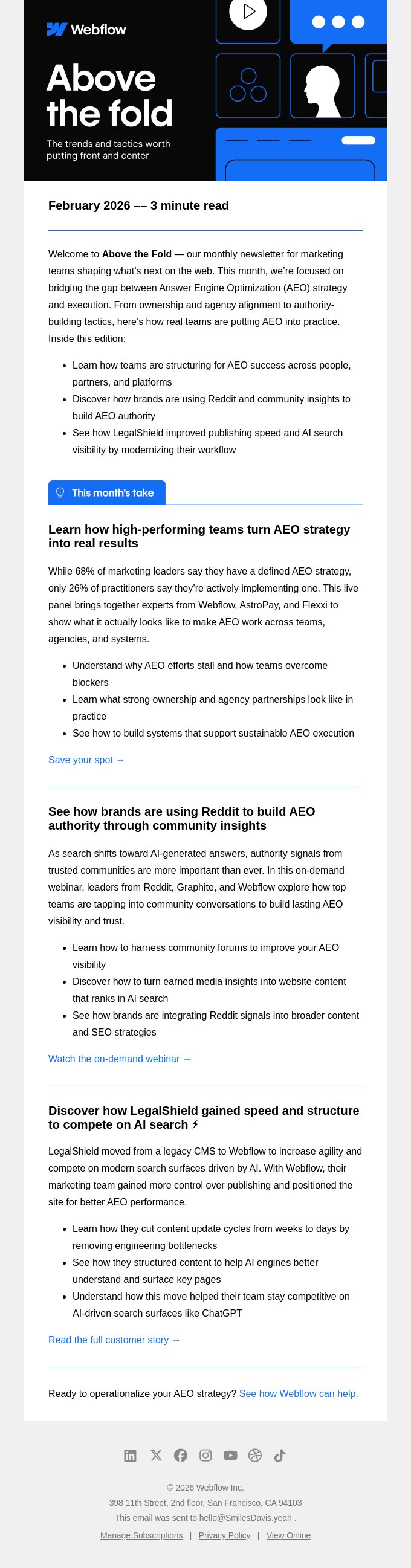
Another Webflow example takes a different approach, focusing more on thought leadership on one strategic theme: AEO. Instead of just listing a bunch of articles, it presents a clear editorial thesis and supports it with three concrete pieces of content that support it. This focused narrative makes the email easier to process, more memorable, and more likely to drive clicks from readers who actually care about the topic.
1Password
This 1Password newsletter works because it makes product education feel useful instead of promotional. It leads with timely updates, breaks the content into clear modules, and mixes product news with practical how-to value, which gives the email a reason to exist beyond “here’s what we shipped.”
From a growth perspective, that balance matters: it keeps current users engaged, reinforces habit, and gives different segments multiple entry points back into the product without relying on one generic CTA.

Wealthsimple
This Wealthsimple newsletter has a distinct editorial voice that makes financial news feel approachable. It also uses hierarchy well, creating a sense of pattern and consistency that helps the reader skim. That repeatability is valuable because newsletters perform best when the audience understands the promise of the format before they even open the email.

Figma
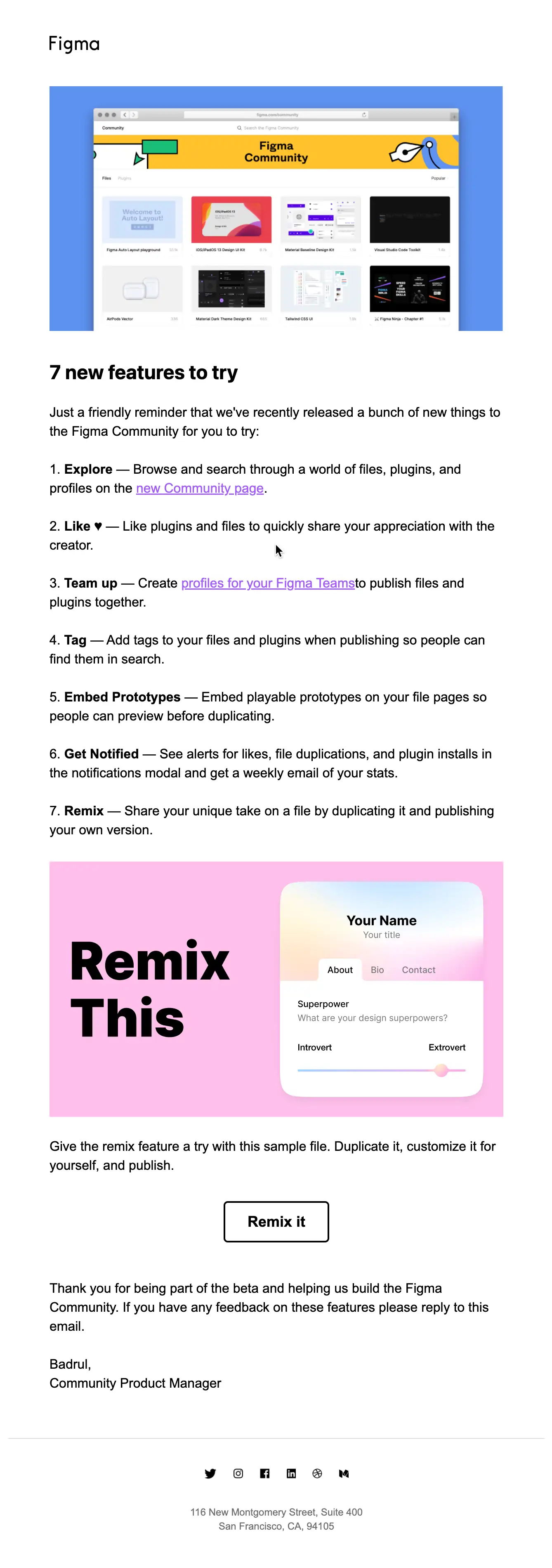
This Figma newsletter is effective because it turns a product update into a lightweight activation email, with clear and actionable reasons and instruction to get started. The design is unmistakably Figma, which strengthens continuity between email and product, and the structure makes it easy to move from awareness to experimentation, which is exactly what you want from a feature-forward newsletter.
Greenhouse
This Greenhouse newsletter works because it is anchored in a strong point of view. It is not just sharing articles; it's framing a timely hiring challenge, backing it with data, and then branching into related resources that deepen the same narrative. It positions the brand as a trusted operator in the space and builds credibility before asking for any bigger action.

Bill
This BILL newsletter behaves like a mini content hub for finance operators. It mixes webinars, tools, customer stories, and event promotion to give its readers many options. From a marketer perspective, that's useful because it creates multiple conversion paths for people at different stages of intent while still keeping the brand voice and visual system consistent throughout.

AllTrails
AllTrails makes its newsletter feel like an extension of its brand mission, not just a content roundup. The email shares outdoor stories, pairs them with specific trails and partner content, and uses a calm, editorial layout that fits the product. From a marketing perspective, it deepens emotional affinity with the brand while still giving readers practical next steps to explore.

Miro
This Miro newsletter does a great job of showing the breadth of the platform without becoming overwhelming. It introduces a headline release, branches into relevant features and use cases, and then highlights event content in a skimmable format. This gives different personas reasons to click while still telling a larger story about Miro's evolution.

Mailchimp
This Mailchimp newsletter turns a broad product update email into something visually energetic and clear. Each module communicates a specific improvement tied to an obvious business outcome, which prevents the email from collapsing into generic release notes. Emails perform better when users can immediately map each feature to a practical win.

Stripe
The Stripe Developer Digest is effective because it respects the audience. The copy is direct, the hierarchy is clean, and every section is built around concrete product use cases rather than marketing abstraction. The tone builds trust from a technical audience because it sounds like product communication, not campaign fluff.

Zapier
Zapier manages to package a lot of motion into a very structured newsletter. It uses repeatable sections (i.e. what’s new, product updates, spotlight, and new apps) so readers can navigate the email quickly. That consistency supports habitual readership, while keeping the content useful for both broad and niche user segments.

CleanMyMac
What makes this CleanMyMac digest effective is that it translates a broad category like “Mac maintenance” into several sections, blending educational content, product utility, video content, and a human Q&A section. That variety reinforces the product’s relevance across multiple user motivations without overcomplicating the layout.

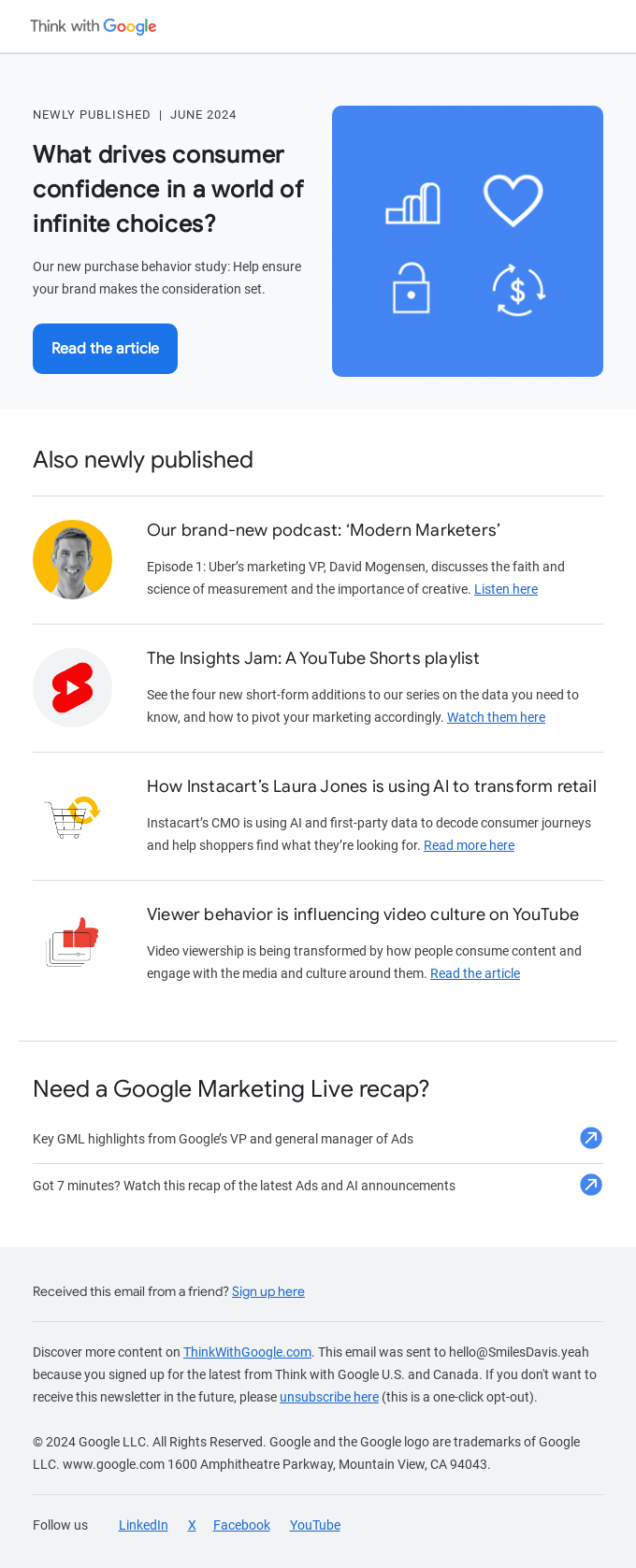
This Google newsletter leans into curation and authority. The hero story is clear, the secondary modules are concise, and the whole email feels designed to help a busy marketer stay current rather than to push product. Trust-based content programs win through consistency and usefulness, and this format helps Google stay top of mind as a source of strategic insight.
Asana
This Asana newsletter works because it aligns all content around distributed work. Rather than dumping a list of updates, it curates a set of related resources around one clear theme, which makes the email feel editorial and intentional. The value proposition is obvious within seconds, the card-based structure is easy to scan, and every section supports the same broader job-to-be-done.

How often to send a newsletter
Unlike transactional notifications or marketing promotions, newsletters follow a cadence. Most SaaS companies send weekly, biweekly, or monthly, depending on how much content they have to share and how frequently their audience wants to hear from them.
The key is consistency. Sending a newsletter every Tuesday morning trains users to expect it, which leads to higher open rates over time. Inconsistent sends or long gaps between issues erode trust and increase unsubscribes.
Here are a few timing considerations:
- Cadence. Choose a frequency you can sustain. A great monthly newsletter beats a mediocre weekly one. Many teams over-commit and burn out both their readers and the team members putting each newsletter together.
- Day and time. Tuesday through Thursday mornings tend to perform best for B2B SaaS, but test with your own audience to find what works.
- Segmentation. Not every user needs to receive the same newsletter. Segmenting by role, product usage, or lifecycle stage enables you to tailor content to what each group cares about. For example, inactive users might re-engage with new features or educational content, while power users might want to see advanced use cases or community content.
Choosing a newsletter tool
Many SaaS companies start by sending newsletters from a standalone email marketing platform like Mailchimp, HubSpot, or similar, which support basic sends: you build a template, import a list, and schedule a delivery. But as your product and audience mature, you start to run into limitations.
There are many advantages to sending newsletters from the same system as your product messaging:
- Product data. Access to product events lets you personalize newsletter content based on what users have (or haven't) done in your app.
- Consistent branding. Sending newsletters from the same system as your transactional emails keeps your design system consistent across every email a user receives from your product.
- Preference management. Users can manage their newsletter subscription alongside their other notification preferences in a single, centralized experience.
The right tool depends on where your team is today. If you're sending a simple monthly update to a single audience segment, a standalone email platform will get the job done. But if you're personalizing content based on product activity, segmenting by user behavior, or managing notifications across multiple channels, you'll benefit from a system that brings newsletters into your broader messaging infrastructure, not keeps them in a separate silo.
Send engaging newsletters with Knock
Engineers, PMs, and marketers use Knock to power cohesive customer messaging that drives engagement, growth, and retention. With Knock, you can send newsletters, marketing campaigns, and cross-channel notifications all from one place, creating a cohesive customer experience.
Whether you need to send a recurring newsletter or trigger product notifications across email, SMS, push, chat, or in-app, Knock can help. If you'd like to try it out, sign up for a free account or chat with our team.